Home Services πŸš€ Accelerators About Contact Us
Starter Accelerator Β· Power Apps

Your PMO, live in
days β€” not months

A pre-configured, enterprise-ready project management solution built on Microsoft Power Apps & Dataverse. Manage every project, risk, resource, and benefit across your organisation from day one.

No blank-canvas build. No months of configuration. Just a proven foundation β€” customised to your organisation and deployed fast.

10 days
Average deployment
10+
Modules included
PA
Power Apps native
100%
Your data, your tenant
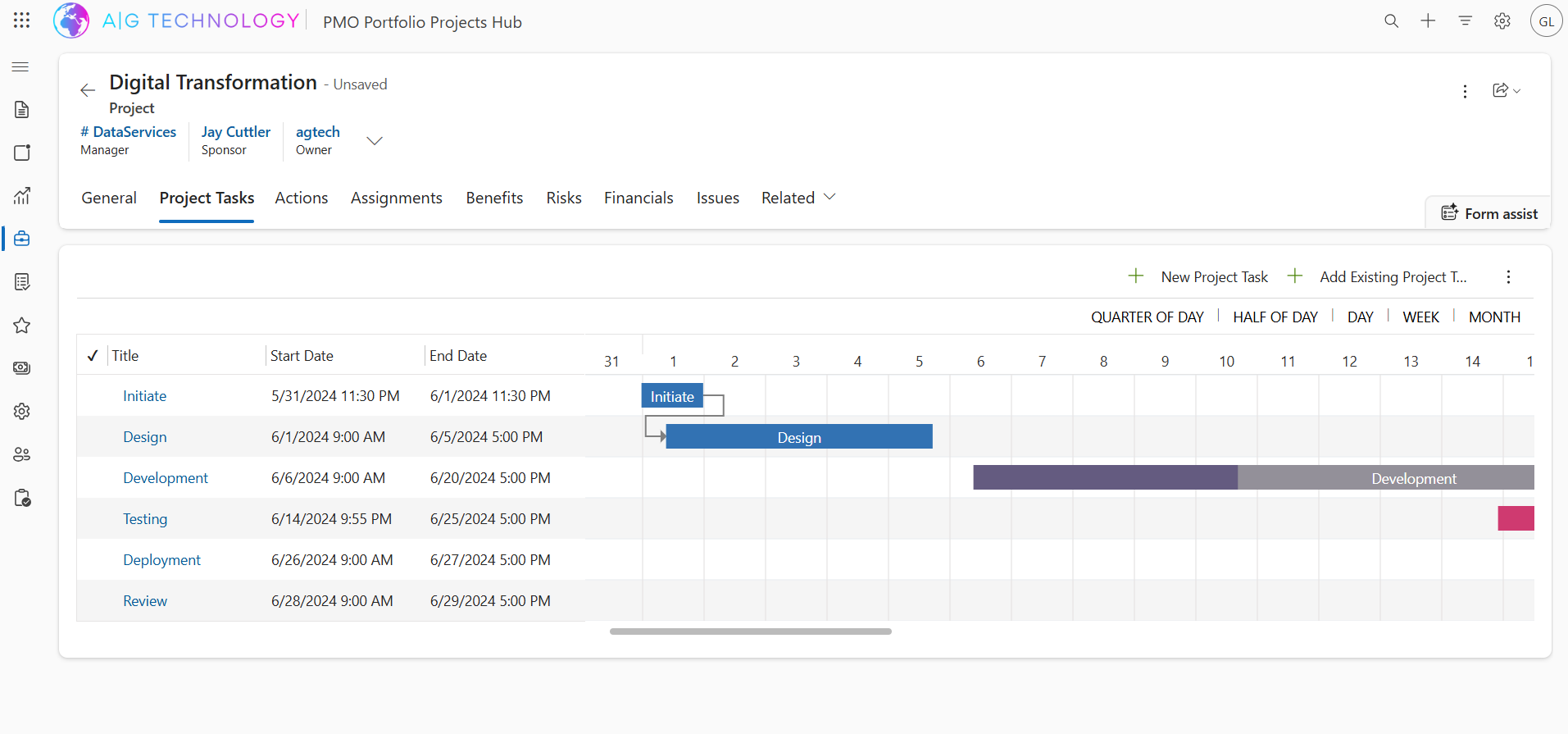
PMO Portfolio Projects Hub β€” Digital Transformation Β· Project Tasks
PMO Accelerator β€” Project Tasks with Gantt chart
πŸš€ Ships in days
βœ…
Gantt, risks, financials & more All pre-built on your Microsoft tenant

A production-ready PMO,
not a starting template

Most organisations spend 6–12 months building a custom project management solution from scratch. Our PMO Accelerator is a fully pre-configured Power Apps model-driven solution β€” complete with all the screens, data models, workflows, and reports your PMO needs β€” customised to your branding and processes in days.

πŸ—οΈ

Pre-built, not pre-made

Every screen, table, form, and flow is production-quality β€” not a demo. We adapt it to your exact terminology, processes, and governance requirements.

☁️

Your tenant, your data

Deployed directly into your Microsoft environment. Your data never leaves your organisation β€” fully sovereign, secure, and compliant from day one.

πŸ”§

Fully extensible

Built on Power Apps and Dataverse β€” no expensive Dynamics 365 licence required. Extend it with Power Automate, Power BI, Copilot, or custom development as your needs evolve.

Everything your PMO needs,
ready on day one

10+ pre-built modules covering the full project management lifecycle β€” from portfolio planning to benefits realisation.

πŸ“

Portfolio Management

Group and govern projects across programmes and portfolios. Get a bird's-eye view of status, budget, and progress in one dashboard.

Core
πŸ“‹

Project Hub

Full project record with general information, tabs for tasks, actions, assignments, benefits, risks, financials, issues, and related records.

Core
πŸ“…

Project Tasks & Gantt

Create and manage project tasks with start/end dates, dependencies, and a built-in Gantt chart for visual timeline management.

Core
⚠️

Risk & Issue Register

Log, score, and track risks and issues with probability/impact matrices, mitigations, owners, and status β€” always audit-ready.

Governance
🎯

Benefits Realisation

Track projected vs. actual benefits across financial and non-financial measures. Demonstrate value delivered across your project portfolio.

Reporting
πŸ’°

Financial Tracking

Monitor budgets, forecasts, actuals, and variances at project and portfolio level. Connect to your finance team's reporting with ease.

Finance
πŸ‘₯

Resource Assignments

Assign team members to projects and tasks, track allocation, and get visibility into resource utilisation across your portfolio.

Resources
βœ…

Actions & Decisions Log

Capture actions, decisions, and meeting outputs. Assign owners, due dates, and statuses β€” and track completion across projects.

Governance
πŸ“Š

Power BI Dashboards

Pre-built Power BI reports embedded in the app. Portfolio health, budget vs. actuals, risk heat maps, and task completion at a glance.

Analytics
πŸ€–

Form Assist (Copilot)

AI-assisted form completion powered by Microsoft Copilot β€” helping project managers draft descriptions, risk statements, and updates faster.

AI Add-on
πŸ””

Automated Notifications

Power Automate flows for task reminders, risk escalations, approval requests, and status updates β€” delivered via Teams and Outlook.

Automation
πŸ”’

Role-Based Security

Pre-configured security roles for PMO Admin, Project Manager, Sponsor, Team Member, and Executive β€” with field-level access control.

Security

Built for real
project management

Every screen you see is production-ready β€” this is what gets deployed into your organisation.

Want a live demo in your own Microsoft environment? Book a session β†’

From sign-off to
go-live in 10 business days

Our structured delivery process ensures your PMO accelerator is live, tested, and your team is trained β€” in 10 business days.

01
Days 1–2

Kick-off & Discovery

We align on your terminology, processes, and any customisation requirements. We provision your environment and begin solution import.

02
Days 3–4

Configuration & Branding

We apply your organisation's branding, configure security roles, set up reference data (departments, categories, statuses), and tailor terminology to match your PMO language.

03
Days 5–6

Integration & Automation

We activate Power Automate flows for notifications and approvals, connect Power BI dashboards, and configure any integrations required.

04
Days 7–8

UAT & Refinement

Your PMO team tests the solution. We address feedback, refine configurations, and validate that everything meets your requirements before go-live.

05
Days 9–10

Training & Go-Live

We deliver a hands-on training session for admins and end-users, hand over documentation, and officially go live. Your PMO is operational.

What you need
to get started

The accelerator is designed to require minimal technical setup from your side. If you have Microsoft 365, you're ready.

βœ…

Microsoft 365 tenant

Any existing Microsoft 365 or Office 365 subscription is all you need to get started.

πŸ“‹

Power Apps licence

The solution runs on a standard Power Apps per-user licence β€” significantly cheaper than a full Dynamics 365 licence. We'll advise on the most cost-effective option for your team size.

πŸ‘€

System admin access

We need temporary system admin rights to deploy the solution β€” which can be revoked immediately after go-live.

🀝

A PMO point of contact

One person from your PMO team for the 10-day engagement to provide feedback, validate, and drive the rollout.

The smarter way to
build your PMO

See how the A|G PMO Accelerator compares to building from scratch or using generic project management tools.

Feature Build from scratch
RECOMMENDEDA|G Accelerator
Generic tools
(Jira, Monday, etc.)
Time to go-live6–12 months10 business days1–2 weeks
Built on Microsoft platformβœ“βœ“βœ—
Power Apps / Dataverse nativeβœ“βœ“βœ—
Gantt chart task managementCustom build requiredβœ“ Built inβœ“
Risk & issue registerCustom build requiredβœ“ Built inLimited
Benefits realisation trackingCustom build requiredβœ“ Built inβœ—
Financial trackingCustom build requiredβœ“ Built inLimited
Power BI dashboardsCustom build requiredβœ“ Pre-builtBasic only
Power Automate workflowsCustom build requiredβœ“ Pre-builtβœ—
Your data stays in your tenantβœ“βœ“βœ— SaaS cloud
Extensible with Power Platform & Azureβœ“βœ“βœ—
Typical cost to deploy€50k–€200k+€8,000 fixedOngoing SaaS fees

Simple, transparent
pricing

One-time fixed fee. No hidden costs, no monthly SaaS subscription. Your platform, your data, your control.

Optional add-ons

📊

Power BI Dashboards

+€1,000

Executive dashboards for portfolio health, project status, financial variance, and resource utilisation — fully connected to your live Dataverse data.

Tailored to your business

Day rate

Need custom fields, additional workflows, system integrations, or bespoke modules? Our consultants are available to extend the solution to your exact requirements.

Excludes Microsoft licensing costs. We will advise on the right licence for your organisation. VAT applicable where relevant.

Common questions

Do we need a Dynamics 365 licence?

No β€” the solution is built on Power Apps model-driven apps and Dataverse, which run on a standard Power Apps per-user licence. This is significantly cheaper than a full Dynamics 365 licence. We will advise on the right option for your team size.

Can we customise the solution after deployment?

Absolutely. The accelerator is a starting point built on standard Power Platform components β€” you (or we) can extend it with new tables, flows, reports, or integrations at any time.

What if we need ongoing support after go-live?

We offer managed services and support retainers. Many clients keep us on a small monthly retainer for enhancements, training new staff, and platform updates.

Can we migrate data from our current PM tool?

Yes β€” data migration is available as an add-on. We'll assess your current data and provide a migration plan. Common sources include Excel, SharePoint lists, MS Project, and Jira.

Is this suitable for non-IT projects?

Yes β€” while we built it on Microsoft technology, the PMO Accelerator is designed for any project type: change management, digital transformation, construction, finance, and more.

See it live in your own environment

Book a 30-minute demo and we will show you the full PMO solution running live in a real Power Apps environment. No commitment required.

Send us a message

Or book a call directly

Pick a time that works for you. 30 minutes with one of our Microsoft specialists.

📅 Book a 30-min call
Reply within 1 business day
🔒No spam, ever
🤝No obligation